GRANOS Computer
Builds. Connects. Operates – and asks before it acts.
GRANOS Computer is a workplace where people and agents work together. It builds and changes software and workflows, connects to the systems you already run through MCP connectors, and operates them – the ERP, mailboxes, documents. Important actions wait for a person, and every step is logged.


What GRANOS Computer does
More than a build tool: it builds, connects and operates.
Three capabilities on one governed platform. Each one runs with the tools an administrator has approved – and with a person deciding what matters.
Build
Creates and changes software and workflows.
A conversation can open its own workbench – file system, Git, shell, preview and browser. The agent works inside it; you see every change in the editor before it is adopted.
- A workbench per conversation: files, Git, shell, preview, browser
- Sub-agents for research next to the build and for independent review
- Changes from sub-agents arrive quarantined and are adopted file by file
- Recurring tasks become repeatable jobs with a human sign-off at the end
Connect
Connects to the systems you already run – through Link (MCP).
Link is the MCP connector layer of GRANOS. Every GRANOS product exposes its tools through it, and third-party systems join through the same protocol, under the same rules. GRANOS Computer only sees the tools an administrator has approved for your tenant and role.
- Tools approved per tenant and role – everything else does not exist for the agent
- Read-only or write, per tool and per account
- Connections per person or organisation, several accounts per kind
- Revoking a tool takes effect immediately
Connected through Link
- GRANOS ERP
- DMS
- Invoice flow
- Order portal
- GRANOS Mobile
- Mailboxes
- Git hosting
- Cloud accounts
- Third-party systems via MCP
Operate
Operates and uses those systems – ERP, mail and documents.
GRANOS Computer works in your systems the way your team does: it reads the ERP record you are looking at, prepares statements and postings, drafts letters and e-mails and works with documents. Anything that changes data or leaves the house is shown first and waits for approval.
- ERP: reads records; writes statements and postings only after approval
- Mail: drafts letters and e-mails from the record you are working on
- Documents: works with the DMS through approved tools
- Acts with the rights of the person who started the task – never more
GRANOS Computer in the housing industry
Three use cases – ready to use, secured in the EU.
GRANOS Computer works through the MCP interface – with an anonymised backup copy of your GRANOS ERP database, with the connected GRANOS systems and with external software. Real data does not leave your system while you develop.
- Available
Build apps with GRANOS Computer
Add-on applications for GRANOS ERP are built with GRANOS Computer – on an anonymised copy of the ERP database, testable right away, built to fixed standards.
How it works
- Access via MCP to an anonymised backup copy of the GRANOS ERP database – no real data.
- The application takes shape in conversation and runs immediately in a preview where you test it with realistic but anonymised data.
- Development templates and standards are included: project template, pipeline with security checks, sign-in, logging.
- Before production we check the architecture in an architecture review.
Examples
- Key and access management for caretakers
- Vacancy list with marketing status and photos
- Inspection app for playgrounds and outdoor areas
Secured by
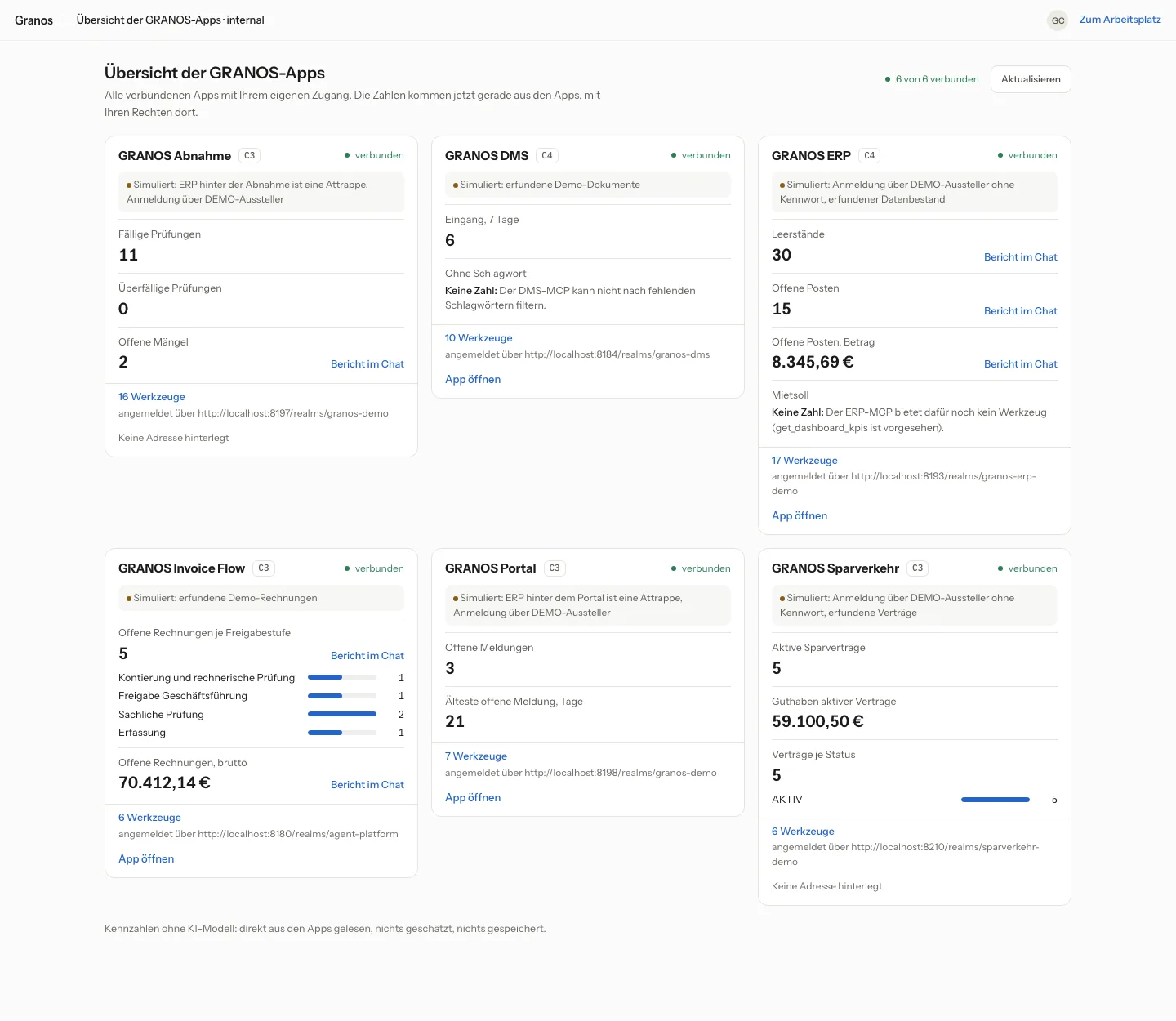
Shows all connected GRANOS apps with figures read directly from the apps. It matters because you see the state of the whole suite in one place, without switching programs. Local demo environment, invented data. - Available
AI reports with GRANOS Computer and Reporting.plus
Create reports and analyses with GRANOS Computer – standardised, repeatable and secured. Reporting.plus, the reporting product of DomConsult, connects via MCP to GRANOS ERP and other data sources.
How it works
- You describe the report in plain language; GRANOS Computer creates it with Reporting.plus – data from GRANOS ERP, SQL databases, Excel or SAP in one data view.
- After your approval the report runs as a repeatable standard report and is refreshed regularly over a secured connection.
- Dynamic report pages: your users ask questions directly against the database and see the answer as a table or chart.
Standard reports from Reporting.plus
- Service charge comparison with the previous year's statement, grouped by cost types of the Geislingen convention
- Service charge controlling with benchmarks and forecast
- Key figures for service charge benchmarking per GdW
- Business plan with planned P&L, planned balance sheet and liquidity planning
- Investment control for new-build and modernisation projects
- Risk report with traffic lights and thresholds as part of the early-warning system
- Management cockpit based on association key figures
Secured by
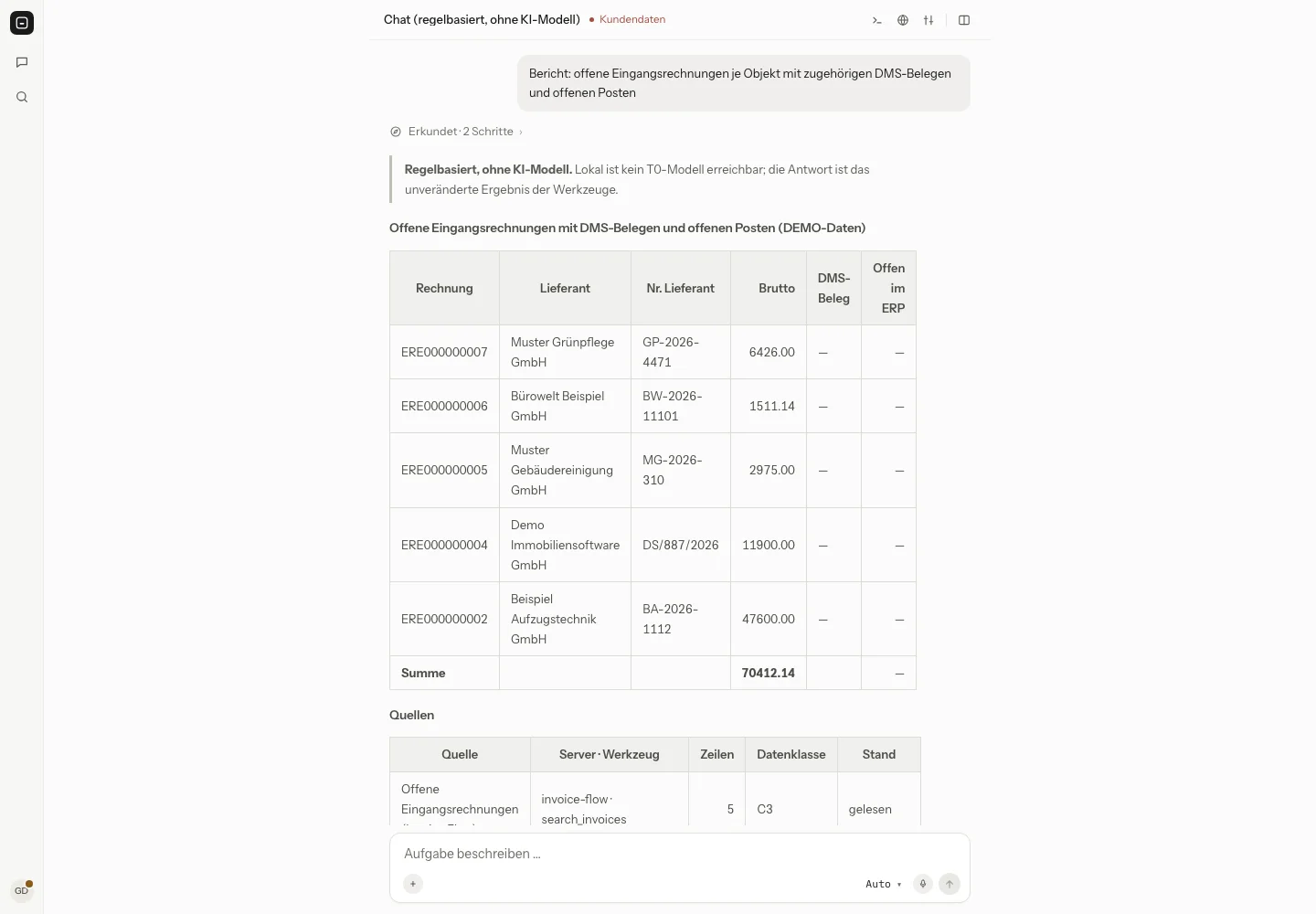
Shows a report of open incoming invoices with documents from the DMS and open items from the ERP. It matters because three systems come together in one answer instead of being reconciled by hand. Demo data. - Available
Operate all software via MCP
Via MCP, GRANOS Computer operates external MCP servers – mailboxes, document storage, calendars and other software – as well as the connected GRANOS systems: GRANOS ERP, DMS, inspections, tenant portal, tradespeople coupling and invoice routing.
How it works
- Administrators approve per tenant and role which tools GRANOS Computer may see – read-only or write.
- GRANOS Computer shows important actions first and waits for approval.
- Every step is logged: who asked, which tools ran, what changed.
Examples
- Check an incoming invoice in invoice routing and submit it for approval
- Prepare letters to tenants as drafts in the mailbox
- File incoming documents in the DMS
- Coordinate appointments for unit acceptances in the calendar
Secured by
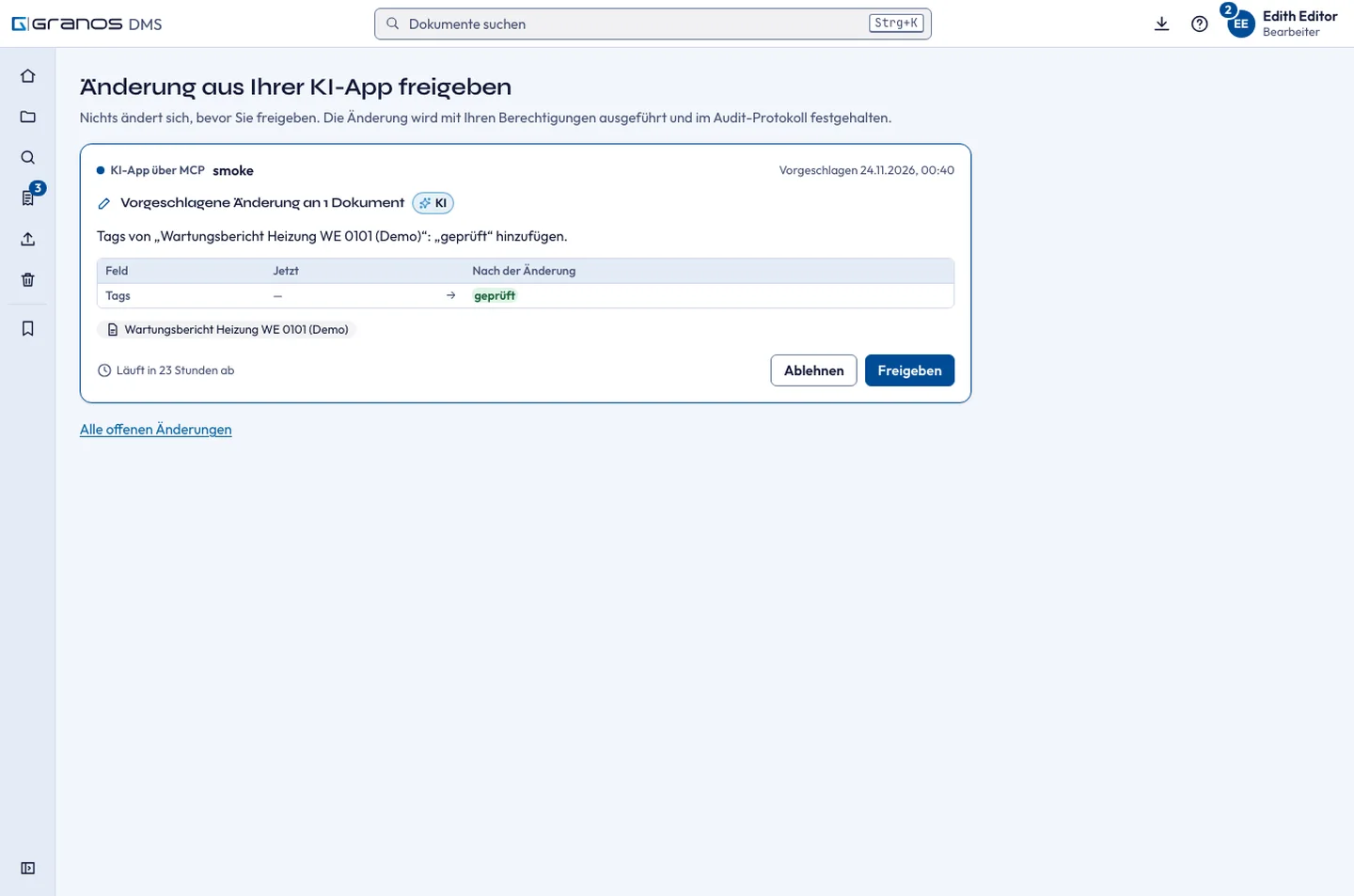
Shows a change proposed via MCP waiting for approval in GRANOS DMS. It matters because nothing changes until a person approves it. Demo data.


DomData standards
Built to a manifest – for the EU AI Act and the EU Data Act.
All three use cases follow the DSAIM standard (DomData Sovereign AI Manifest). That also applies to the applications you build with GRANOS Computer.
- Every application ships a signed ai-manifest.json: allowed processing tiers, maximum data class, models, tools with risk levels, logging, EU AI Act classification and prohibited purposes.
- A policy checks every AI call against the manifest; confidential data stays in the EU.
- Data export and traceability are built in – a basis for the obligations under the EU Data Act.
- Hosting and processing in the EU.
The manifest supports conformity with the EU AI Act and the EU Data Act. It is not a certification and does not replace a legal review in the individual case.
Built with GRANOS Computer
References: software built with GRANOS Computer
Software that was built with GRANOS Computer – shown with approval. GRANOS Computer was the workplace it was built in.
Reference
WOCON
Planning and controlling for the housing industry
Built by DomData AG for DomusConsult GmbH with GRANOS Computer.
- Client
- DomusConsult GmbH
- Built by
- DomData AG
- Built with
- GRANOS Computer
What was built
Multi-year business and property planning for housing companies – investment and maintenance plans, loans and debt service, depreciation, cost-centre accounting and liquidity – in one web application instead of a collection of spreadsheets.
How it was built
DomData AG developed WOCON with GRANOS Computer: agents worked in their own workbenches, every change went through review and an automated pipeline, and releases are rolled out to a development and a customer environment.
WOCON is a product of DomData AG, developed in cooperation with its customer DomusConsult GmbH. DomusConsult GmbH is a separate company and not the same as DomConsult, the owner of GRANOS. WOCON is not part of GRANOS.
In control
What stays the same in every pillar
Whether GRANOS Computer builds, connects or operates – the same rules apply. They are part of the platform, not a setting someone can forget.
- Human approval
- Important actions wait for a person. An approval card says what should happen, where, how much and who else may decide – ignoring it is never consent; the run pauses until someone decides.
- Audit log
- Who asked, which tools ran, what changed and who approved – in an append-only log, exportable for your auditors.
- EU hosting
- Application data, documents and model inference stay on infrastructure in the European Union. The default tier T0 runs open-weight models on our own GPUs in the EU.
- Processing tiers
- T0 own inference on EU GPUs, T1 EU sovereign cloud, T2 external providers – blocked by default. The tier is chosen per data class.
- Secrets
- Credentials live in a vault, never in the chat. Files leave only to registered recipients via protected links that expire.
One loop for every task
From a one-line question to a new workflow – GRANOS Computer always runs the same four steps.
You ask
In plain language, from the record or the project you are working on.
ResultTask with context
It plans with approved tools
Through Link it sees only the tools released for your tenant and your role – read-only or write.
ResultPlan and tool list
You see the preview
Code changes, statements, letters and postings are shown before anything is written.
ResultPreview or diff
You approve – audited
After your approval GRANOS Computer executes. Who asked, which tools ran and what changed is logged.
ResultChange and audit entry
Security and data protection
In short: GRANOS runs in EU data centres, roles and permissions control access, and changes can be traced.
- Operated in EU data centres
- Roles and permissions per user
- Traceable changes
- AI actions only after a person approves
Watch GRANOS Computer build, connect and operate.
Pick a process – a workflow, a mailing, a statement – and we show you the full loop from request to audited approval.